
How to Automate Appointment Booking Through Phone Calls
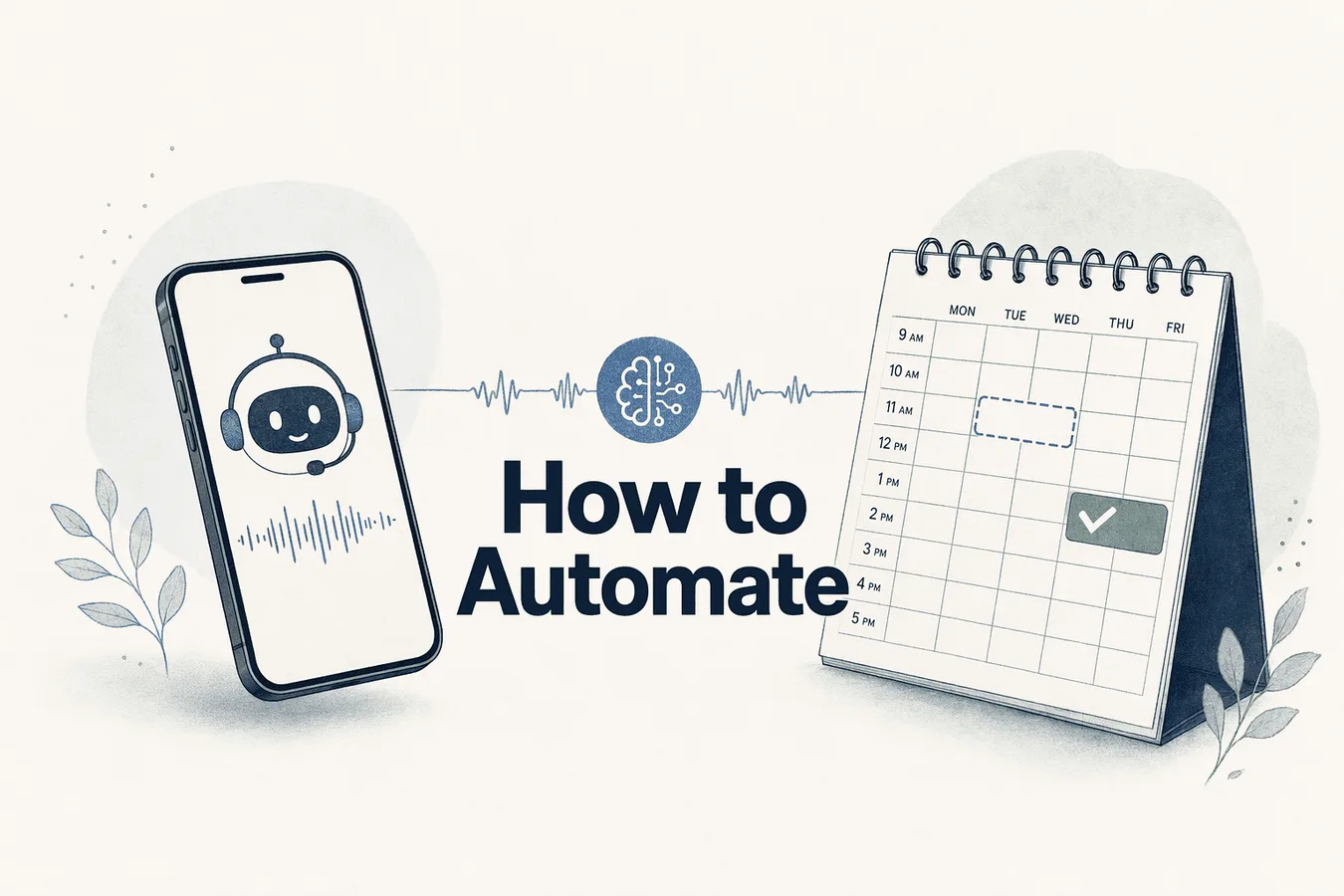
Manual appointment scheduling consumes staff time, creates scheduling conflicts, and leads to missed bookings during after-hours calls. Voice AI automation handles inbound and outbound appointment calls 24/7, checking calendar availability in real-time and confirming bookings without human intervention.
Key Takeaways
AI voice appointment booking requires three integrated layers: telephony routing, conversational AI logic, and calendar/CRM APIs
Successful deployment spans 2–4 weeks covering calendar integration, call flow design, compliance configuration, and testing protocols
Human handoff triggers after two clarification attempts prevent the 40% abandonment spike from AI-only rigidity
TCPA compliance requires prior express consent for automated calls and immediate opt-out handling across all jurisdictions
Testing 8–10 edge-case scenarios before launch exposes deployment risks including double-booking, accent recognition, and multi-service requests
How AI Voice Appointment Booking Works (Architecture Overview)
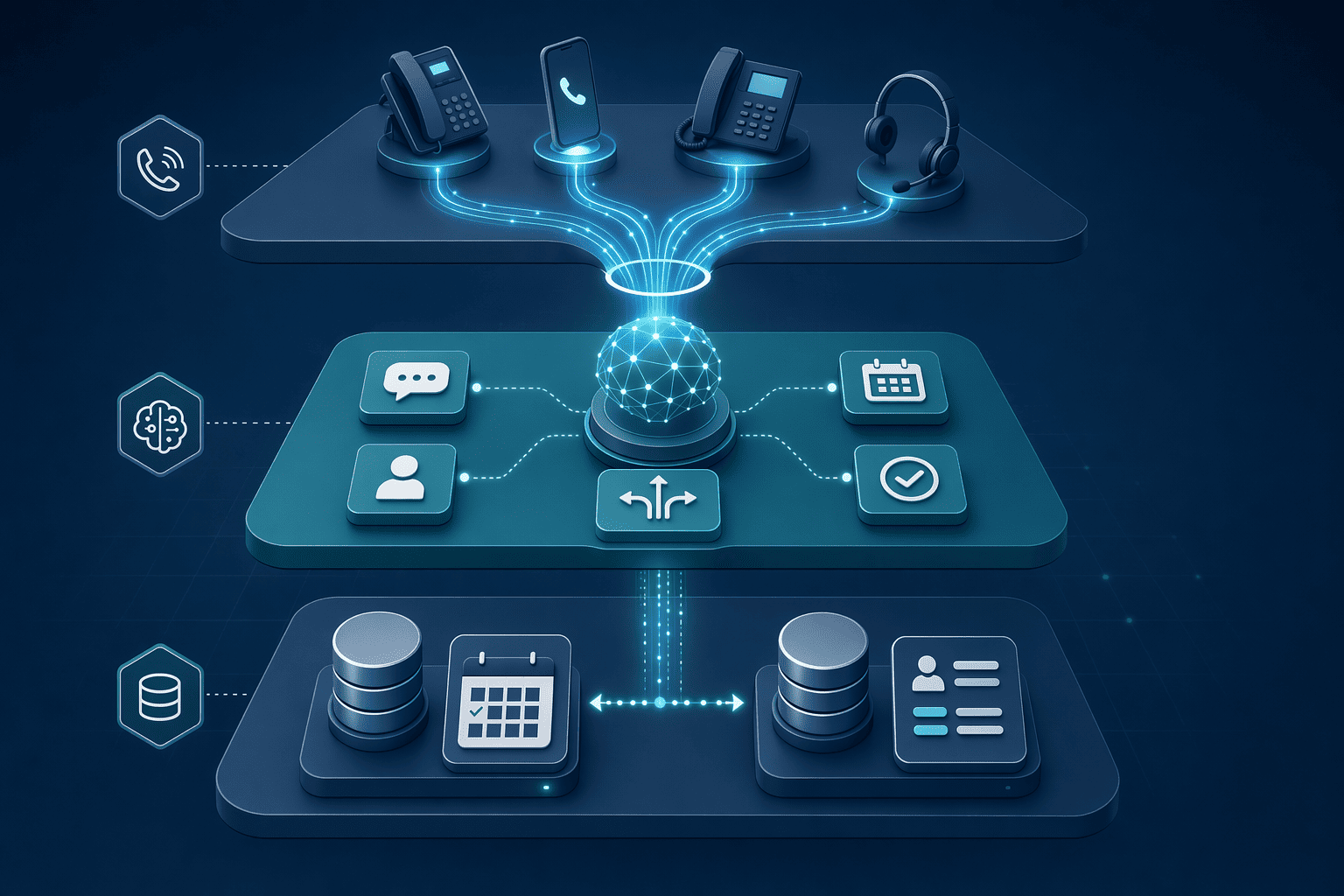
Automating appointment booking through phone calls requires three integrated layers working in concert: a telephony foundation that handles voice traffic, an AI agent application layer that interprets booking requests and resolves conflicts, and a data layer that writes confirmed appointments into your calendar and CRM. Platforms like EchoLeads connect these systems so that when a prospect calls, the AI agent queries calendar availability in real time, books the slot, and syncs the record across your tools—without human touch.
The Three-Layer Integration Stack
The telephony layer uses SIP trunking or VoIP services to route incoming and outgoing calls to the AI agent. The application layer—conversational AI that parses intent, extracts date and time slots, and detects calendar conflicts—sits atop the telephony infrastructure. IBM's framework on AI agent architecture describes this as slot-filling workflows where the agent validates availability before committing the booking. The data layer consists of calendar APIs (Google Calendar, Outlook) and CRM webhooks that receive booking confirmations, write lead records, and trigger follow-up sequences. EchoLeads books appointments into Google Calendar, Outlook, or CRM-based schedulers using bi-directional CRM sync so every confirmed slot updates your sales pipeline automatically.
Real-Time vs Batch Sync Trade-Offs
Real-time calendar checks query availability during the live call, preventing double-booking but adding 200–500 ms latency per query. Batch sync (polling calendar APIs every 5 to 15 minutes) reduces per-call overhead but risks race conditions when two prospects book the same slot between sync intervals. High-volume businesses typically deploy real-time sync for appointment-critical workflows and batch sync for follow-up reminders. Cost implications: real-time API calls scale linearly with call volume, while batch sync incurs fixed-interval overhead regardless of traffic.
Prerequisites Checklist Before Setup
Before deploying a voice AI booking system, ensure you have:
Calendar API credentials for Google Calendar, Outlook, or your chosen platform, with read/write permissions enabled
CRM webhook endpoints to receive booking payloads and update lead records in real time
Telephony provider account (Twilio, similar SIP trunking service) with inbound and outbound call capacity
DNC scrubbing list access to filter opt-out numbers before dialing outbound campaigns
TCPA consent infrastructure documenting how and when prospects opted in to automated calls
With the architectural foundation established, implementation begins with the data layer that feeds real-time availability to the voice agent.
Step 1: Connect Your Calendar and CRM Systems
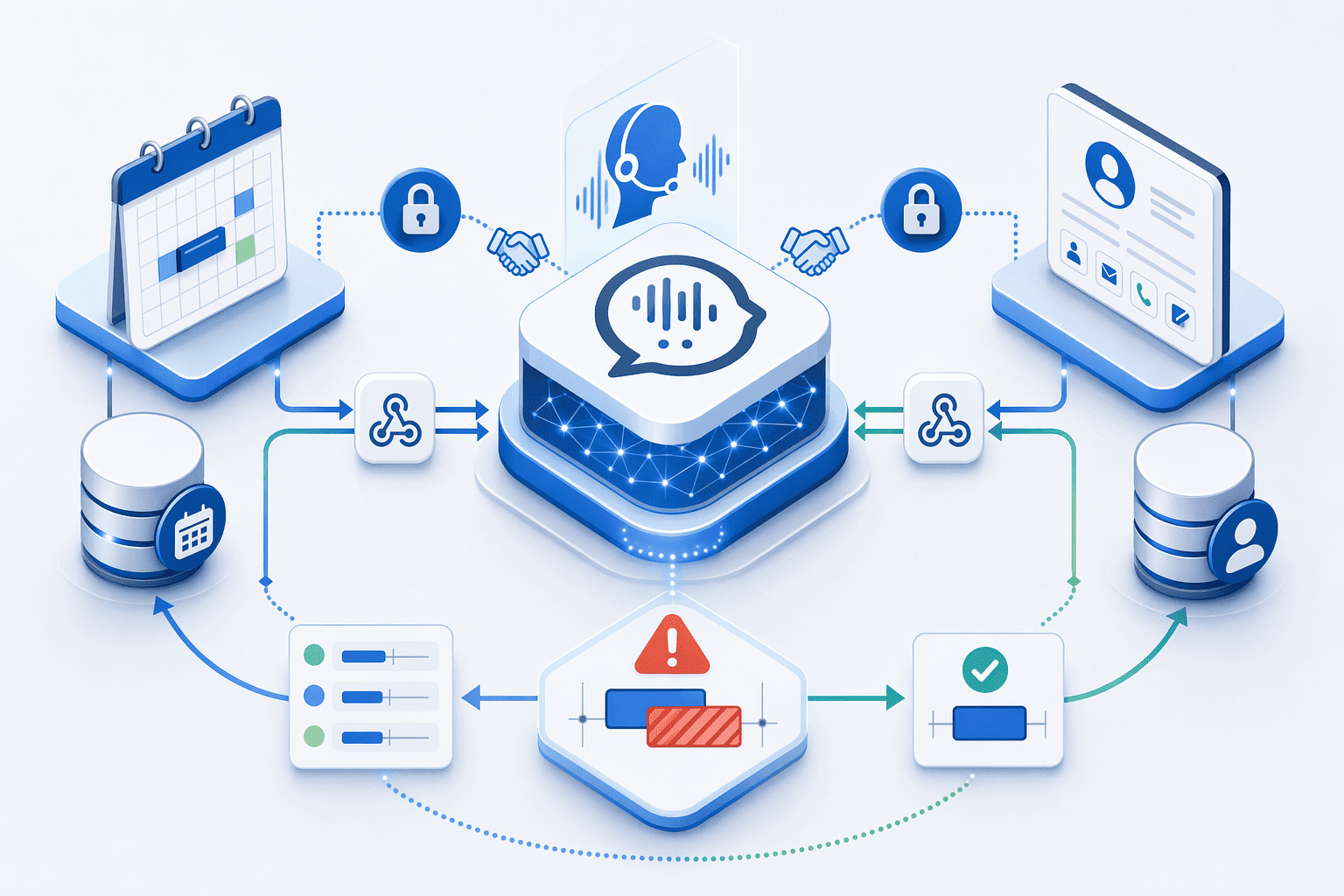
Voice AI appointment booking requires two data connections before a single call goes live: calendar API access to query availability and write confirmed appointments, and CRM bi-directional sync to log qualification data and create contact records. This step walks through the OAuth setup, webhook configuration, and conflict detection logic that zero competitors document.
Calendar API Connection Setup
Generate OAuth credentials in Google Cloud Console (for Google Calendar) or Azure AD (for Microsoft Graph API/Outlook). Configure redirect URIs to point to your voice AI platform's callback endpoint, this is where the authorization token lands after user consent.
Configure webhook endpoints for real-time availability queries. The voice AI system sends GET requests to your calendar API asking for free/busy slots within a specified date range; the API returns available time blocks the agent can offer during the call.
Implement timezone normalization logic. Incoming calls may originate from any timezone, while your team's calendars use their local timezones. The system must convert caller-provided times (e.g., "2pm Pacific") into UTC, query the calendar, and present options in the caller's timezone.
Test with a sample appointment creation call. Simulate an inbound call, confirm a time slot verbally, and verify the POST request writes the appointment to the correct calendar with accurate start/end times, timezone metadata, and attendee details.
Platforms like EchoLeads handle OAuth renewal automatically and book appointments directly into Google Calendar, Outlook, or CRM-based schedulers, while custom integrations require manual token refresh logic and error handling for expired credentials.
CRM Bi-Directional Sync Configuration
Configure the voice AI system to create or update CRM contact records during live calls. When a caller provides their name, phone number, and qualifying details (budget, timeline, pain points), the system writes this data to Salesforce, HubSpot, or proprietary CRM platforms via REST API calls. EchoLeads provides bi-directional CRM sync with major platforms, writing back qualification scores, conversation transcripts, and next-step recommendations without manual data entry. The flow: incoming call triggers availability query → calendar API returns free/busy slots → voice AI presents options → caller confirms → appointment POST request writes to calendar → CRM webhook receives appointment data and logs the interaction under the contact's record.
Conflict Detection and Double-Booking Prevention
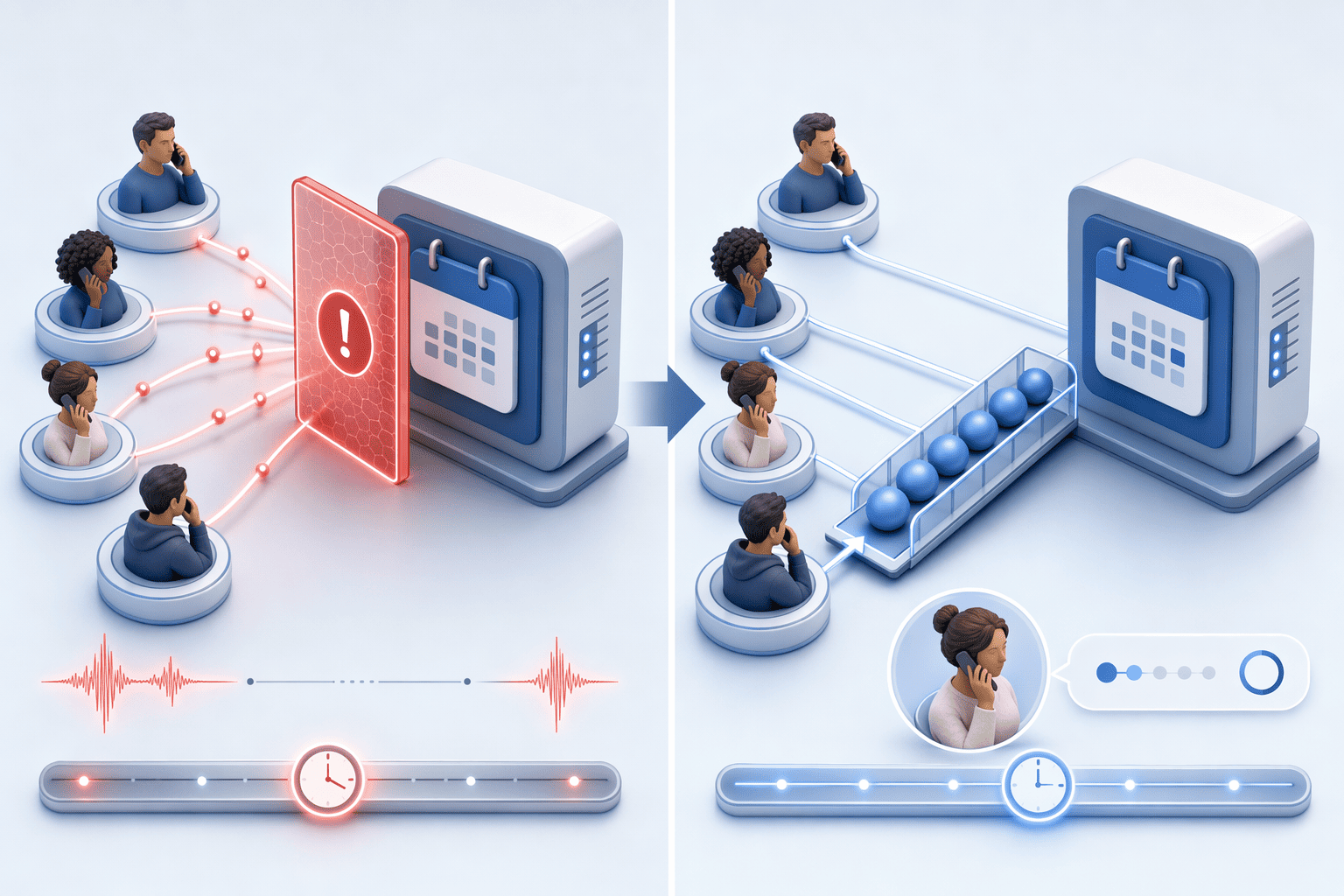
If two callers request the same 2pm slot within a 5-second window, the system locks the slot on the first confirmed booking and presents the next available time to the second caller. This requires race-condition handling at the database layer: the calendar API checks availability, the voice AI reserves the slot with a temporary hold, and the final POST request commits the appointment only if the slot remains free. Multi-calendar availability queries (checking multiple team members' calendars for the earliest open slot) add another layer: the system must aggregate free/busy data across calendars and offer the first overlap that satisfies minimum meeting duration requirements.
Once calendar and CRM connections are live, the next layer defines how the AI actually converses with callers to capture appointment details.
Step 2: Design Your Conversational Call Flow
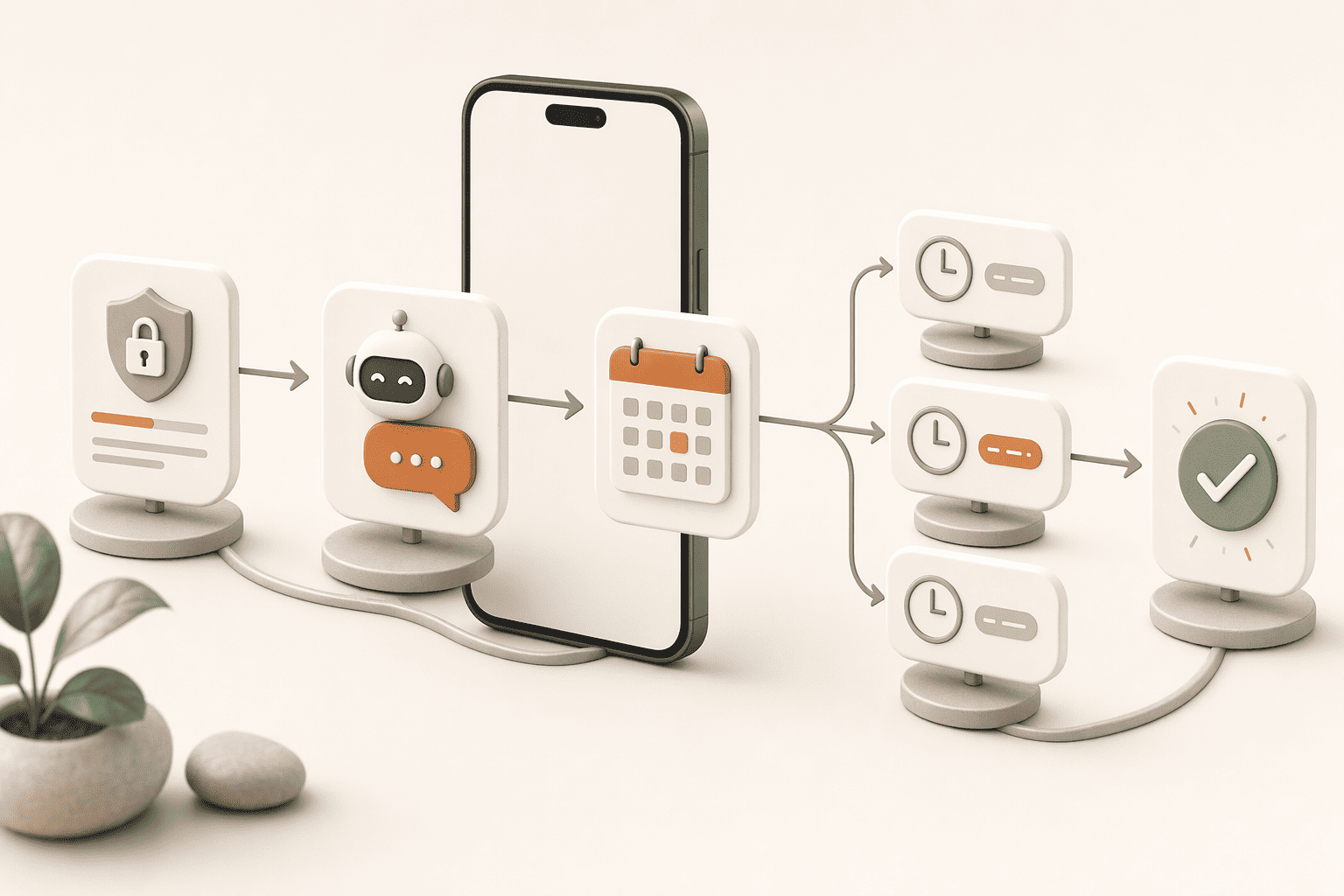
A well-structured call flow reduces hang-ups and drives bookings. Start with a decision-tree template: 'AI: Hi [Name], this is [Business]. I can help you book an appointment. What day works best for you? → Caller: Thursday → AI: I have 10am, 2pm, and 4pm available Thursday. Which time?' Front-load the purpose disclosure, research shows callers hang up when greetings exceed 8 to 10 seconds or hide the call intent. Avoid opening with 'This call may be recorded...' before stating why you're calling; that phrasing triggers immediate hang-ups.
Availability Check and Slot Presentation Logic
Query the calendar for the caller's timezone and present slots in their local time. Confirm the timezone verbally: 'That's 2pm Pacific time, does that work?' When no slots match the requested day, offer the next three available options: 'Thursday is fully booked. I have Monday at 9am, Tuesday at 11am, or Wednesday at 3pm. Which works for you?' EchoLeads books appointments directly into Google Calendar, Outlook, or CRM-based schedulers, syncing in real time to prevent double-bookings.
Rescheduling and Cancellation Paths
When a caller requests a reschedule, the AI asks for their phone number or confirmation code, retrieves the existing appointment from the CRM, cancels it, then offers new availability. If the system cannot locate the appointment after two lookup attempts, escalate to a live agent. Include policy constraints in the flow: 'Our cancellation policy requires 24-hour notice. Since it's now within that window, I'll transfer you to our team to discuss options.' EchoLeads is not suitable for every call, complex rescheduling scenarios involving multiple participants or policy exceptions should route to human agents.
Confirmation and Reminder Setup
End each booking by repeating the appointment details: 'You're confirmed for Thursday, March 6 at 2pm Pacific time. I'll send a confirmation to [email/phone].' Send an SMS or email confirmation immediately, then configure automated reminders at 24 hours and 2 hours before the appointment. The first 20 seconds decide whether the caller stays or leaves, so treat every confirmation touchpoint as a retention opportunity.
Call flow design determines what the AI says; compliance configuration determines what it legally can say and when it must obtain consent.
Step 3: Configure Compliance and Consent Workflows
Regulatory adherence is non-negotiable when deploying automated appointment booking. TCPA requires prior express written consent before placing automated calls to consumers, and lenders must integrate Do Not Call (DNC) registry checks to avoid contacting restricted numbers. This section provides the compliance configuration checklist competitors mention but rarely explain how to implement.
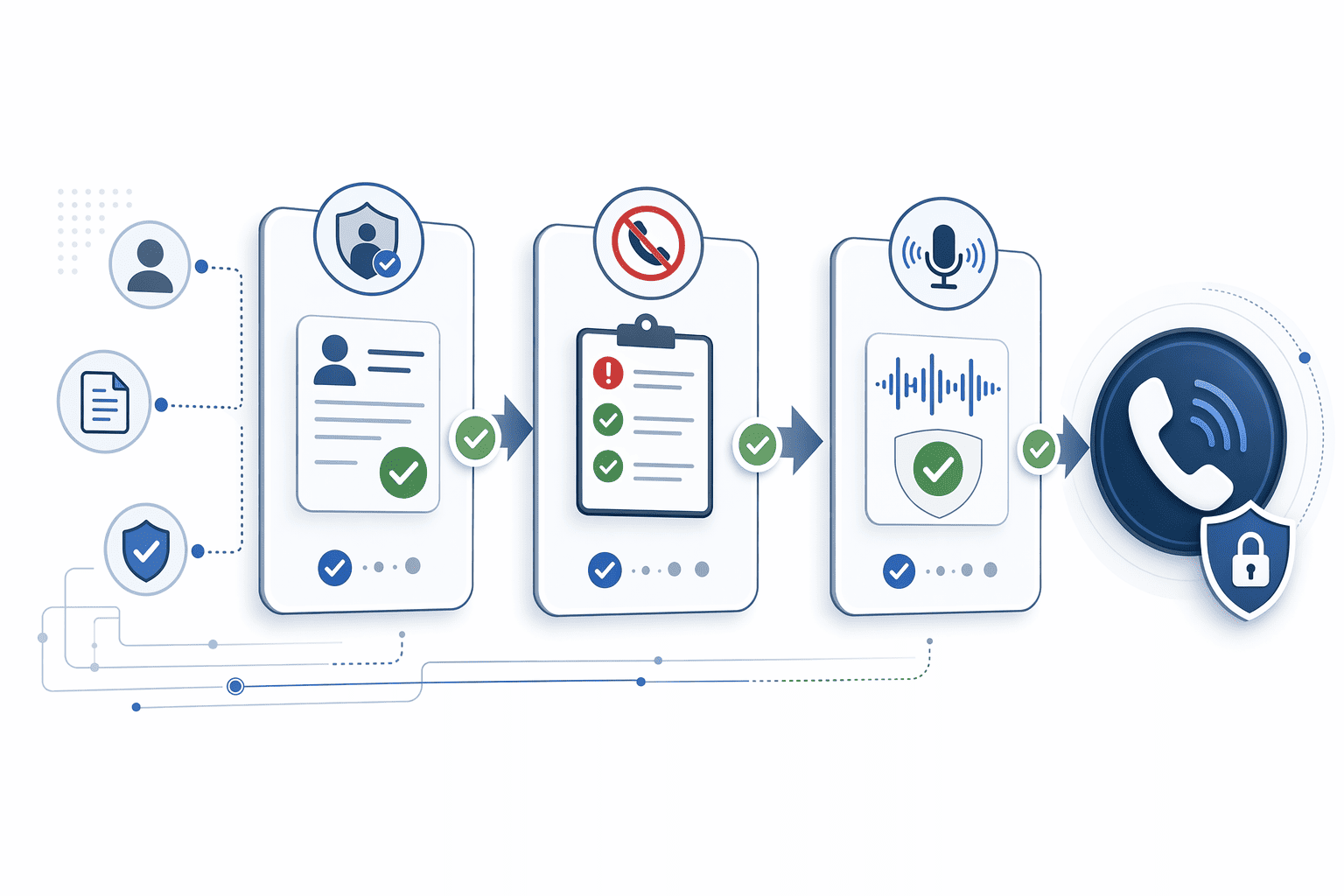
Authoritative guidance on TCPA and call recording requirements for automated booking systems is limited, and legal counsel should be consulted for your jurisdiction.
TCPA Consent and DNC Scrubbing Setup
Before the first outbound call, configure three foundational workflows. First, integrate your dialer with the National Do Not Call Registry and schedule nightly DNC list scrubbing, platforms like EchoLeads offer automated DNC list synchronization, while custom-built systems require manual CSV uploads. Second, verify prior express consent for every contact: store consent timestamps, IP addresses, and audit trails in your CRM so each call references a consent record. Third, implement consent verification logic that blocks outbound calls to numbers lacking a valid consent timestamp. In India, automatic DND checking is integrated with real-time NDNC API updates ; U.S. Deployments follow TCPA's written consent standard.
Call Recording Notice and Opt-Out Mechanisms
Your AI agent's opening script must disclose call recording upfront: 'This call may be recorded for quality and training purposes' satisfies most state-level consent requirements. Configure opt-out phrase detection for common removal requests ('stop calling me', 'remove me from your list', 'take me off this list'). When the AI detects an opt-out phrase, the system must (1) immediately cease the call, (2) log the request with timestamp in CRM, (3) add the number to the internal suppression list, and (4) trigger a confirmation email or SMS within 24 hours. Automated opt-out handling honors consumer requests immediately, reducing compliance risk and manual follow-up overhead.
Geographic and Time-of-Day Restrictions
TCPA prohibits automated calls before 8:00 AM or after 9:00 PM in the recipient's local time zone. Configure your dialer to check the contact's area code or ZIP code against a timezone database and restrict calling windows accordingly. India's TRAI regulations impose similar restrictions: AI calls are limited to 9 AM to 9 PM, and no calls are permitted on national holidays. State-specific rules add complexity, Florida mandates stricter opt-out requirements for health insurance marketing calls, so consult legal counsel when deploying across multiple jurisdictions. Set up automated call time restrictions in your platform's scheduling logic to enforce these rules without manual oversight.
Compliance protects the business from regulatory risk; human handoff protects the customer experience when automation reaches its limits.
Step 4: Set Human Handoff Triggers and Escalation Rules
Human handoff triggers are the operational safety net that prevents AI-only rigidity. Configure escalation rules that detect when a conversation exceeds the AI's capability window and route the caller to a live agent before frustration drives abandonment.

Complexity Threshold Triggers
Define the conversation complexity signals that should trigger human handoff. Implement these five specific escalation triggers:
Caller explicitly requests a human agent
AI cannot locate existing appointment after two lookup attempts
Caller mentions a policy exception or special accommodation
Sentiment score drops below -0.6 on a -1 to +1 scale
Conversation exceeds 5 minutes without confirmed booking
Quantify the threshold: calls requiring more than two clarification attempts have 40% higher abandonment rates, configure the AI to offer human escalation after the second "Can you repeat that?" exchange.
Sentiment and Frustration Detection
Configure sentiment analysis thresholds that escalate calls before the caller hangs up. Watch for frustration signals: repetition of the same request, speaking over the AI, or long pauses that signal exasperation. Platforms like EchoLeads detect sentiment shifts in real-time and configure handoff triggers based on conversation keywords or sentiment scores; basic IVR systems rely on caller-initiated transfer requests only.
Ownership Transfer Protocols
Detail the technical handoff process: when escalating, the AI must pass (1) caller phone number and CRM record, (2) requested appointment date/time, (3) conversation transcript with sentiment flags, (4) reason for escalation, to the live agent queue via webhook or API call. The caller should hear: "Let me connect you with a team member who can help with that" followed by hold music, not silence. Call out the anti-pattern: never transfer a call without context, the human agent must see the conversation history and escalation reason before pickup, or the caller experiences the "start from scratch" frustration that drives hang-ups.
Handoff rules define when to escalate; testing validates that the entire system behaves correctly before real customers interact with it.
Step 5: Test, Launch, and Monitor Performance
Edge Case Scenario Testing
Before going live, validate your AI agent against 8 to 10 edge-case scenarios that expose deployment risks competitors overlook:
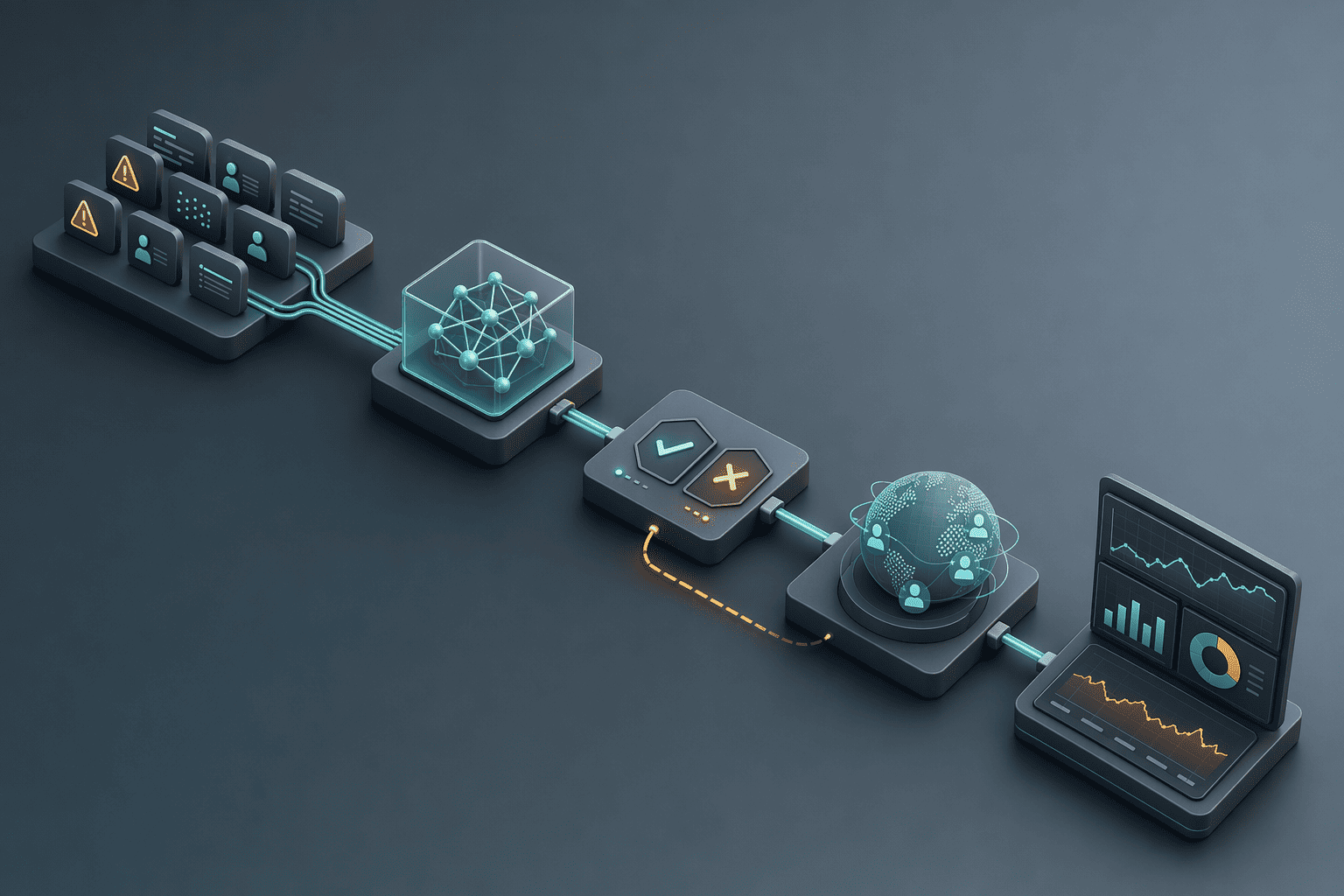
Double-booking race condition, simulate two simultaneous requests for the same calendar slot to confirm the system locks availability in real time.
No-availability response, test how the agent handles a fully booked calendar (does it offer waitlist registration or alternative times?).
Timezone mismatch, have a caller in PST request an appointment during EST business hours; verify the agent converts and books correctly.
Cancellation lookup failure, attempt to cancel an appointment not found in the CRM; confirm the agent escalates gracefully rather than fabricating a confirmation.
Opt-out phrase detection, mid-call, say "take me off your list" or "stop calling me" and verify the system flags the contact for suppression.
Sentiment-triggered escalation, simulate a frustrated caller using phrases like "this is ridiculous" or "I want a human now"; confirm the agent routes to a live representative.
Background noise speech recognition, place a test call from a busy street or coffee shop to validate accuracy under real-world acoustic conditions.
Accent variation handling, recruit test callers from 3+ geographic regions (e.g., South Asian English, Southern US English, Australian English) to confirm the agent understands diverse speech patterns.
Conduct 20 to 30 test calls covering these scenarios before launch, logging outcomes in a spreadsheet with columns for scenario, expected behavior, actual behavior, and pass/fail. Aim for a 95%+ pass rate before going live, anything lower signals script gaps or insufficient training data.
Accent and Dialect Validation
Speech recognition accuracy degrades sharply when training data doesn't reflect your caller population. Test the agent with callers representing your actual customer demographics, if you serve multilingual markets, recruit native speakers of Hindi, Spanish, or Mandarin (depending on your regions) to validate the system handles code-switching and non-native English fluently. Record each test call and review transcripts for misrecognized entities (names, dates, appointment types). If the agent misinterprets "Thursday at 3 PM" as "Wednesday at 2 PM" more than 5% of the time, retrain the model with additional phonetic examples before deploying.
Performance Metrics and KPI Tracking
Define 6 metrics to monitor post-launch, these quantify deployment health and surface optimization opportunities:
Booking conversion rate, successful bookings divided by total calls; mature deployments complete 50% of calls, though performance varies by industry and call complexity.
Call abandonment rate, hang-ups before booking or escalation, divided by total calls; a 60% conversion rate with 10% abandonment is healthier than 80% conversion with 30% abandonment, because high abandonment signals friction that erodes customer trust over time.
Average call duration, target 2 to 4 minutes for straightforward bookings; calls exceeding 6 minutes suggest the script needs streamlining or the agent is cycling through unnecessary clarification loops.
Human escalation frequency, should stabilize below 20% of calls once the deployment matures; higher rates indicate the agent lacks training for common objections or questions.
No-show rate, compare AI-booked appointments to human-booked baselines; if AI bookings show 15%+ higher no-shows, the confirmation or reminder cadence may need adjustment.
First-call resolution rate, bookings completed without callback or escalation; this metric isolates the agent's ability to handle the full workflow autonomously.
Track these weekly for the first month, then shift to monthly reviews. Use the data to refine scripts, retrain models, and adjust escalation triggers, deployment is not a one-time event but an iterative optimization loop.
Even well-tested systems encounter friction points once live traffic reveals patterns the test suite didn't anticipate.
Common Implementation Challenges and Solutions
Calendar API rate limiting causes sync delays during high call volume, when multiple callers request availability simultaneously, the system may hit Google Calendar's 10 requests/second limit, causing a 2-3 second delay that feels like dead air to the caller. Solution: implement request queuing and tell the caller 'Checking availability now…' to fill the silence.
Speech Recognition Accuracy in Noisy Environments
A caller booking from a busy street may say 'Tuesday at two' but the AI transcribes 'Tuesday at three' due to traffic noise. Solution: always confirm the appointment details verbally before finalizing ('Just to confirm, that's Tuesday at 2pm, is that correct?') and log low-confidence transcriptions for human review.
Multi-Service and Multi-Location Scheduling Complexity
When a caller requests multiple services (e.g., medical consultation + lab work), the AI must (1) determine total duration, (2) check provider availability for the combined block, (3) confirm both services can be completed sequentially, this requires calendar APIs that support duration-based queries, not just free/busy checks. Platforms like EchoLeads can route appointment requests across multiple locations by checking availability at the nearest 3 clinics and presenting options to the caller.
Conclusion
Custom-built API integrations deliver maximum flexibility for unique scheduling logic but require 4 to 8 weeks of engineering time; platforms like EchoLeads accelerate deployment to 2 to 4 weeks with pre-built calendar connectors and compliance templates, trading customization depth for implementation speed. Full automation maximizes efficiency but risks customer frustration in edge cases, mature deployments balance 70 to 80% AI resolution with 20 to 30% human escalation for complex scenarios, maintaining service quality while capturing automation gains.
As voice AI transcription accuracy improves and calendar APIs adopt richer availability query standards (multi-participant scheduling, service-duration-aware slots), the 2 to 4 week deployment timeline will compress further, but the core implementation principles of call flow design, compliance configuration, and human handoff triggers will remain foundational to successful automation.
Map your current appointment booking workflow (manual steps, calendar touchpoints, compliance requirements) before evaluating platforms, use that baseline to identify which integration complexity your team can handle and where pre-built solutions save deployment time.
Frequently Asked Questions
How long does it take to set up AI voice appointment booking?
Typical deployment spans 2 to 4 weeks: calendar API OAuth setup and webhook configuration (3 to 5 days), call flow design and conversational logic mapping (1 to 2 weeks), compliance workflow configuration for TCPA and consent (1 week), and edge-case testing across 20 to 30 scenarios (1 week) before live launch.
What calendar systems can AI voice agents integrate with?
AI voice agents integrate with Google Calendar, Microsoft Outlook, and Apple Calendar via CalDAV through OAuth-authenticated API connections. The system requires read access to query availability and write permissions to create confirmed appointments, with bi-directional sync ensuring calendar changes propagate to the CRM and vice versa.
Do I need TCPA compliance for automated appointment booking calls?
Yes, TCPA requires prior express consent for automated calls even to existing customers, and systems must honor DNC registry entries and process opt-out requests immediately. Authoritative guidance on TCPA and call recording requirements for automated booking systems is limited, and legal counsel should be consulted for your jurisdiction.
When should the AI hand off to a human agent?
Configure handoff after five escalation triggers: explicit caller request for human assistance, failed appointment lookup after two attempts, policy exceptions the AI can't resolve, detected negative sentiment, and calls requiring more than two clarification attempts. The 40% abandonment spike after repeated clarifications makes early escalation critical.
How accurate is AI voice recognition for appointment booking?
Accuracy varies by accent, background noise, and call quality, mature deployments like Assort Health's 190M+ patient interactions demonstrate production-grade performance. Testing with callers representing your actual demographics (multilingual markets, regional accents) is key, and verbal confirmation of date, time, and service details before finalizing protects against transcription errors.
Can AI voice agents handle multi-location appointment scheduling?
Advanced platforms route requests across locations by querying availability at multiple sites and presenting options to the caller, while basic IVR systems require location pre-selection. Multi-location logic adds complexity: the AI must check provider availability per site, account for travel time between locations if services span sites, and confirm each location's specific service offerings.
What metrics should I track after launching AI appointment booking?
Monitor six KPIs: booking conversion rate, call abandonment rate, average call duration, escalation frequency, no-show rate, and first-call resolution. High abandonment signals call flow friction, calls requiring more than two clarifications see 40% higher drop-off, indicating the AI needs handoff trigger refinement or conversational redesign.