
How to Automate Appointment Booking Through Phone Calls (2026 Guide)
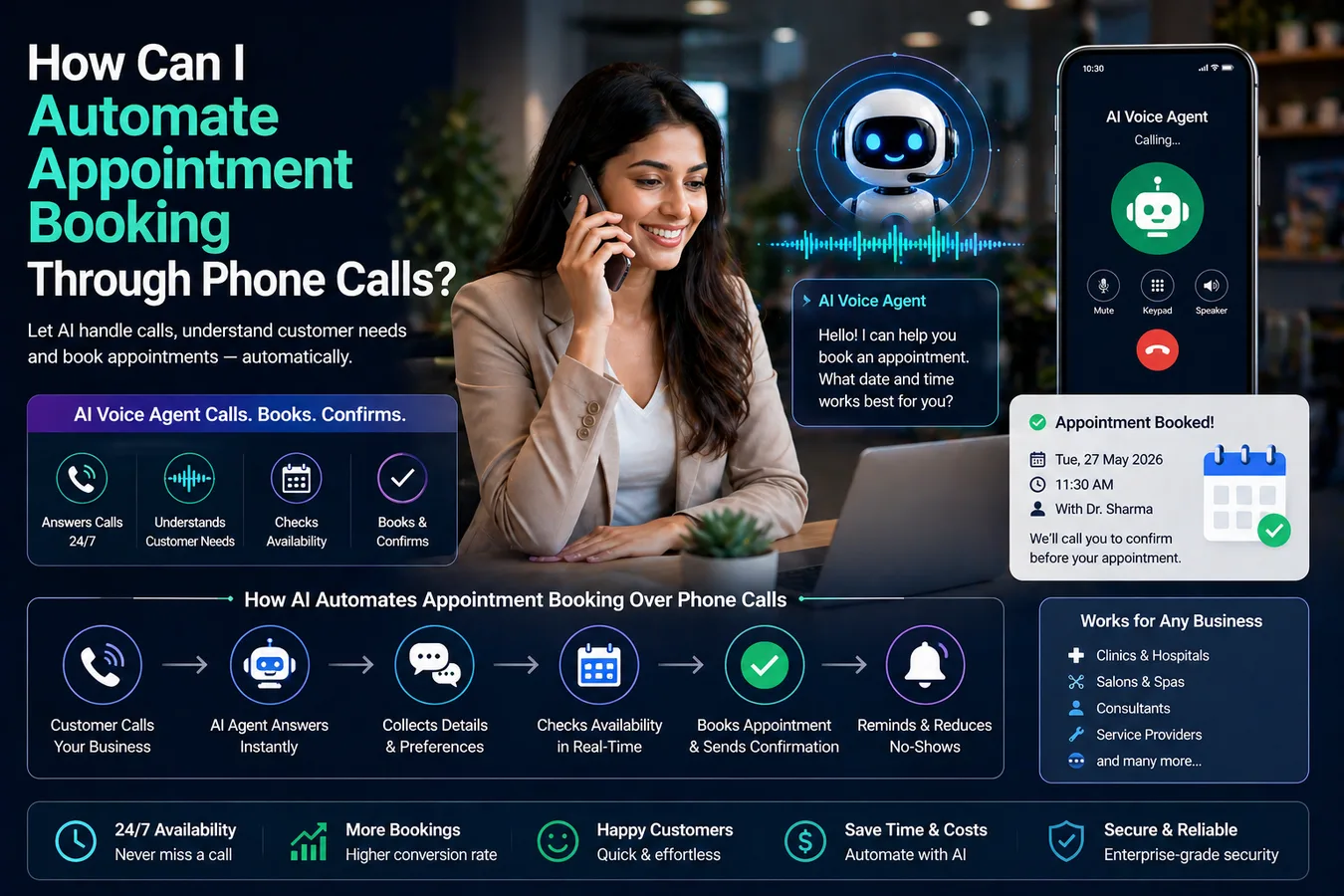
How to Automate Appointment Booking Through Phone Calls (2026 Guide)
Automating appointment booking through phone calls eliminates manual scheduling friction, reduces missed opportunities, and allows businesses to capture bookings 24/7 without human intervention using AI voice agents integrated with calendar systems.
Introduction
Phone calls remain the dominant channel for appointment scheduling, yet most businesses still rely on manual processes that create bottlenecks, missed calls, and frustrated customers. When 92% of customer interactions occur over the phone but connect rates remain stubbornly low, the gap between demand and capacity becomes a revenue problem [2]. EchoLeads solves this through AI-powered voice agents that answer every call within 3 seconds, check real-time calendar availability, and confirm bookings before prospects lose interest. Unlike traditional scheduling systems that require back-and-forth emails or manual coordination, EchoLeads' AI appointment scheduling operates autonomously across multiple channels—phone, WhatsApp, and SMS—ensuring no inquiry goes unanswered regardless of time zone or business hours. This guide explains how to implement phone-based appointment automation, from initial setup through advanced workflows like rescheduling, cancellations, and intelligent reminder sequences.
Understanding Automated Phone Appointment Workflows
How AI Voice Agents Handle Appointment Bookings
The automated appointment booking workflow begins when a caller dials your business number. Instead of reaching voicemail or waiting on hold, an AI voice agent answers immediately and engages in natural conversation. The agent asks qualifying questions—service type, preferred date and time, contact details—while simultaneously checking calendar availability through API connections. Systems like EchoLeads complete this entire process in under 30 seconds, delivering instant confirmation to callers [1]. The AI handles common scenarios conversationally: when a requested slot is unavailable, it suggests alternative times; when callers express urgency, it prioritizes same-day or next-available slots; when details are unclear, it asks clarifying questions without sounding robotic.
Essential Components of Phone Booking Automation
A complete phone appointment automation system requires four integrated components. First, an AI voice platform (like EchoLeads' AI calling agents) that handles conversational interactions with natural language processing. Second, calendar integration that provides real-time availability data from Google Calendar, Outlook, or multi-calendar systems [2]. Third, booking logic that prevents double-bookings, respects buffer times, and handles service-specific duration requirements—a tooth implant appointment might require 60 minutes while a cleaning takes 30 [2]. Fourth, notification workflows that send confirmations, reminders, and follow-ups across phone, SMS, and WhatsApp channels to reduce no-shows.
Step-by-Step Implementation Guide
Step 1: Configure Your AI Voice Agent
Start by defining your appointment types, service durations, and business hours. EchoLeads provides pre-built templates for common industries—healthcare, professional services, home services—that deploy in 15-25 minutes. Configure your agent's conversational flow: greeting script, qualifying questions (name, phone, service type, preferred timing), availability checking logic, and confirmation messaging. For businesses with multiple service offerings, create branching logic where the AI routes callers based on their stated needs. A dental clinic, for example, might offer teeth cleaning (30 minutes) versus implants (60 minutes), each requiring different calendar slot allocations [2].
Step 2: Integrate Calendar Systems
Connect your calendar platform to enable real-time availability checks. Most businesses use Google Calendar or Microsoft Outlook; EchoLeads integrates with both plus CRM-based scheduling tools like HubSpot and Salesforce. The integration must support bidirectional sync: when the AI books an appointment, it immediately writes to the calendar; when a human manually blocks time, the AI sees that slot as unavailable. For businesses with multiple staff members or locations, configure round-robin routing or resource-based assignment so appointments distribute evenly across available providers [2]. Advanced setups handle multi-calendar scenarios—checking both work and personal calendars to prevent conflicts [5].
Step 3: Build Confirmation and Reminder Workflows
Booking the appointment is only the first step; ensuring the customer shows up requires structured follow-up. Configure automated reminder sequences that trigger at predetermined intervals: 24 hours before the appointment, 2 hours before, and 15 minutes before. EchoLeads sends reminders through multiple channels—AI voice calls, WhatsApp messages, and SMS—to maximize engagement. Studies show that automated reminder systems reduce no-show rates by 60% [1]. Include clear instructions in reminders: location details, parking information, preparation requirements, and easy reschedule/cancel options. When customers reply to reschedule, the AI re-initiates the availability-checking workflow without human intervention.
Step 4: Handle Rescheduling and Cancellations
Life happens, and customers need flexibility to change appointments. Build self-service workflows where callers can reschedule or cancel by phone without reaching a human. The AI identifies the existing appointment by asking for the customer's name and phone number, confirms the current booking details, then guides them through selecting a new time slot [5]. When cancellations occur, the system immediately frees the calendar slot and optionally adds the customer to a waitlist or follow-up campaign. EchoLeads' healthcare automation includes specialty workflows for handling urgent rescheduling requests and triage scenarios that require immediate human escalation.
Comparing Appointment Automation Approaches
Approach | Setup Time | Phone Support | Multi-Calendar | Cost Model | Best For |
|---|---|---|---|---|---|
EchoLeads AI Voice Platform | 15-25 minutes | Native AI calling with 3-second response | Yes, unlimited calendars | $25/month flat rate | Businesses needing full phone + messaging automation |
Calendly + Phone Integration | 1-2 hours | Requires third-party voice AI | Yes, via paid plans | $10-16/user/month + voice AI costs | Teams already using Calendly who want to add voice |
Google Calendar + Custom Build | Several weeks | Requires custom development | Yes, via API | Developer time + hosting | Tech teams building proprietary solutions |
CRM-Native Scheduling | 2-3 hours | Limited or manual | Depends on CRM | Included with CRM subscription | Businesses prioritizing CRM-first workflows |
The comparison reveals that dedicated AI voice platforms like EchoLeads offer the fastest deployment and most comprehensive phone automation. While calendar-first tools like Calendly work well for web-based booking, they require separate voice AI integrations to handle phone calls [2]. Custom-built solutions provide maximum flexibility but demand significant development resources and ongoing maintenance. CRM-native scheduling ties tightly to existing workflows but rarely includes sophisticated conversational AI for phone interactions.
Advanced Considerations for Phone Booking Automation
Handling Complex Scenarios and Edge Cases
Real-world appointment booking involves scenarios beyond simple slot selection. Callers may request same-day emergency appointments, ask for specific staff members, need wheelchair-accessible locations, or have language preferences. Configure your AI to recognize urgency signals and escalate appropriately: EchoLeads' intelligent routing transfers high-priority medical calls to on-call staff while handling routine bookings autonomously [3]. For multi-location businesses, the AI should ask location preferences before checking availability. When callers express confusion or frustration, implement sentiment detection that triggers human handoff with full conversation context preserved.
Compliance and Data Protection for Healthcare
Healthcare appointment automation must comply with HIPAA, PIPEDA, and regional privacy regulations. EchoLeads' healthcare-grade infrastructure includes end-to-end encryption, consent capture before collecting protected health information, call recording disclosures, and audit trails for every interaction [3]. The system should verify patient identity before discussing existing appointments or medical details, maintain secure data retention policies, and provide opt-out mechanisms for automated communications. For non-healthcare businesses, ensure compliance with TCPA regulations regarding automated calling and obtain proper consent before placing outbound reminder calls.
Measuring ROI and Optimization
Track key metrics to quantify automation impact: call answer rate (target: 100% within 5 seconds), booking completion rate, no-show percentage, time-to-booking, and customer satisfaction scores. Businesses using EchoLeads report 70% reduction in missed bookings and 85% appointment show rates [1]. Analyze conversation transcripts to identify where callers drop off or express confusion, then refine your AI's scripting and logic. Monitor calendar utilization to ensure optimal slot allocation—unused appointment capacity represents lost revenue. Calculate cost savings by comparing automated booking costs against previous manual scheduling labor hours.
Frequently Asked Questions
Can AI voice agents handle rescheduling and cancellations autonomously?
Yes, modern AI appointment systems like EchoLeads manage the complete appointment lifecycle including rescheduling and cancellations without human intervention. The AI identifies existing bookings by verifying customer details, confirms current appointment information, then guides callers through selecting new time slots or processing cancellations [5]. When changes occur, the system automatically updates calendars, sends new confirmations, and frees slots for other customers.
How do automated systems prevent double-booking across multiple calendars?
Advanced appointment automation platforms integrate with multiple calendar sources simultaneously—Google Calendar, Outlook, Apple Calendar—and check availability across all connected calendars before confirming bookings [2]. EchoLeads implements real-time conflict detection that flags overlapping appointments, respects buffer times between meetings, and enforces service-specific duration requirements to maintain schedule integrity.
What happens when the AI encounters a request it cannot handle?
Quality AI appointment systems implement intelligent escalation workflows that transfer complex scenarios to human staff with full conversation context. EchoLeads recognizes edge cases—urgent medical needs, special accommodation requests, pricing questions—and performs warm handoffs where human agents receive complete transcripts, customer details, and stated needs without requiring callers to repeat information [3].
How quickly can businesses deploy phone appointment automation?
Deployment speed varies by solution complexity. Cloud-based platforms like EchoLeads offer 15-25 minute setup using pre-built industry templates for common use cases like healthcare, professional services, and home services. Integration with existing calendar and CRM systems typically adds 1-2 hours for configuration and testing before going live with full automation.
Do automated reminder sequences actually reduce no-show rates?
Yes, structured reminder workflows deliver measurable impact on attendance. Automated systems that send multi-channel reminders—AI voice calls, WhatsApp messages, SMS—at strategic intervals (24 hours, 2 hours, 15 minutes before appointments) reduce no-show rates by 60% compared to manual or single-channel reminder approaches [1].
Related articles
6 Best AI Outbound Calling Solutions for Loan Verification
Compare AI outbound calling platforms that verify loan applications 24/7
5 Common Causes of Long Bank Loan Inquiry Call Wait Times
Why do bank customers complain about long wait times for loan inquiry calls? Learn the 5 Common Causes of Long Bank Loan Inquiry Call Wait Times.
4 Best AI Voice Lead Qualification Tools for Insurance
Compare AI voice platforms for insurance lead qualification through automated outbound calls.